
Short answer: Crossfade in music means overlapping the end of one track with the start of the next while one fades out and the other fades in. It can make a transition feel continuous, but it can also overlap lyrics or shorten an ending you wanted to hear. Use it when that blend sounds better than letting one track finish before the next begins.
For background music in a venue, the test is straightforward: does the change draw less attention to itself while preserving the music? A longer overlap is not automatically a smoother or more suitable transition.
For the source and hardware behind that playback route, use the business music setup guide.
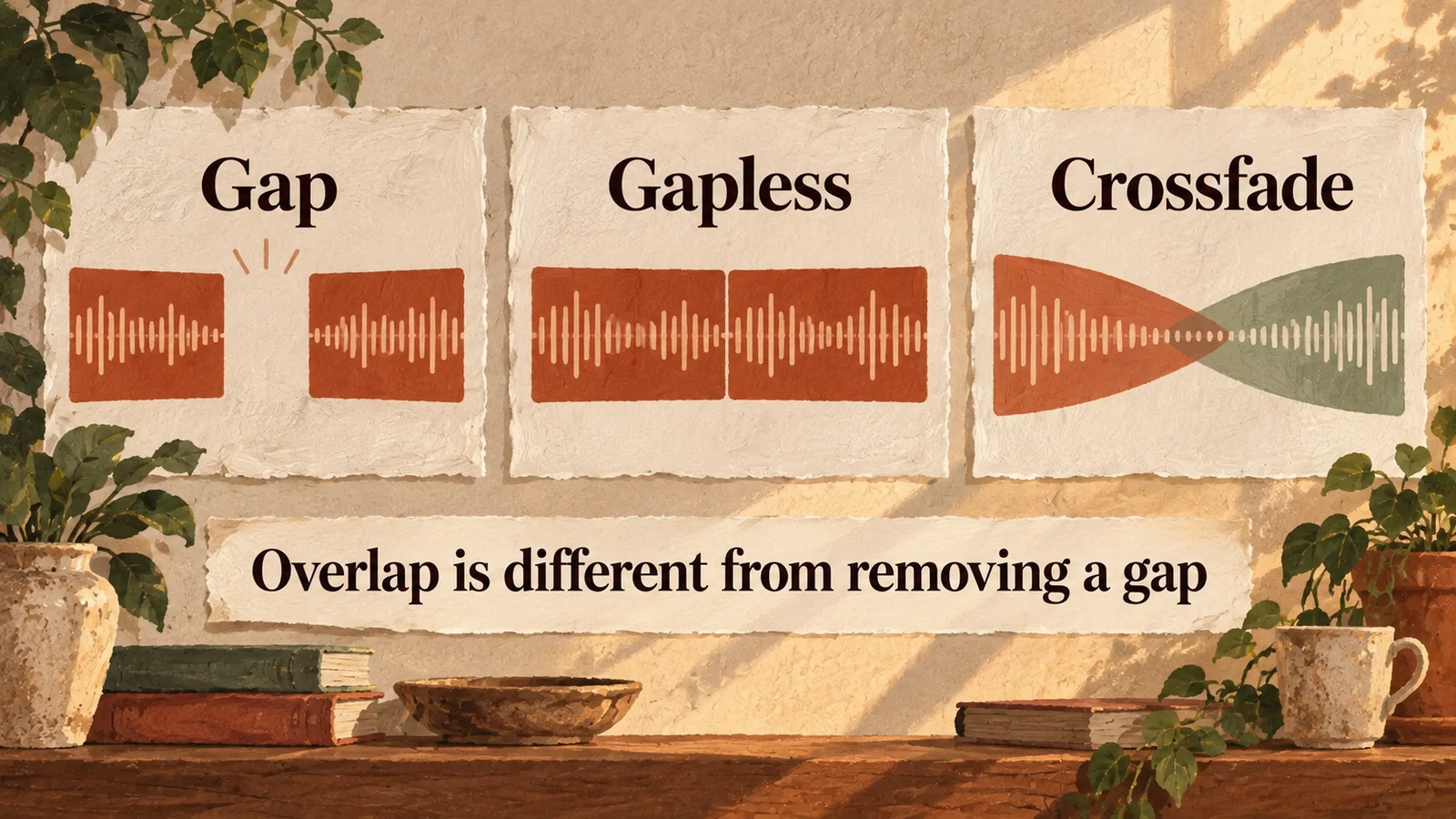
Crossfade, gapless playback and silence are different
Crossfade blends two pieces of audio for part of their duration; gapless playback removes a gap between tracks without requiring that blend. Silence can also be part of the recording itself. Identify which of these you are hearing before changing a setting. Audacity defines the overlap technique in its crossfade guide, while Spotify's transition documentation distinguishes crossfade from gapless playback.
| Transition | What happens | What to check |
|---|---|---|
| Separate playback with a gap | One track ends, a pause occurs, then the next begins | Whether the pause is in the files or playback behaviour |
| Gapless playback | The next track follows without an added playback gap | Whether that preserves an album's intended sequence |
| Crossfade | The outgoing and incoming audio overlap with fades | Whether vocals, rhythm and endings work together |
Those provider documents explain the technique and named controls. They are not a recommendation to use a personal streaming account for a venue or a claim that every business player supports the same features.
How long should a crossfade be?
Use the shortest overlap that makes the particular transition work, then listen to the full boundary through the actual playback system. There is no duration that suits every pair of songs. An instrumental fade can accept a different overlap from a vocal ending followed by an immediate vocal entrance. A setting that improves one pair may damage the next.
Audacity's manual suggests around five seconds as a common starting point for crossfading music, while explicitly allowing shorter or longer fades according to the material and preference. Treat that as an editing starting point, not a venue standard or a promise that one player setting will work across a catalogue.
If the first song's final phrase matters, let it finish or shorten the overlap. If two singers compete, try a different track order or no crossfade at that boundary. If the rhythms clash, increasing the fade length may simply make the clash last longer.
Listen to the boundary in three parts
Check the outgoing ending, the shared overlap and the incoming opening separately, then hear the whole transition without interruption. This catches problems that a quick listen at the moment of change can miss. Keep the room volume unchanged during the comparison so a level adjustment does not hide a weak transition. Use representative boundaries from the programme rather than one unusually easy pair.
At the ending, listen for clipped lyrics, a musical resolution disappearing or a fade beginning before the song feels complete. During the overlap, listen for competing vocals, a sudden swell, a hollow dip or incompatible beats. At the opening, check whether the new song arrives clearly rather than losing its first phrase underneath the outgoing track.
For a venue, repeat the test at the counter or guest position. A transition that is interesting through headphones can be distracting beneath a conversation. The goal is a boundary that fits the room's job, not an impressive demonstration of mixing.
Make a simple crossfade in Audacity
When you are permitted to edit the recordings, place the two files on separate tracks, overlap the desired ending and opening, and apply the fades to that region. Audacity's step-by-step instructions cover positioning, alignment, trimming and the Crossfade Tracks effect. Keep an untouched copy of the files and listen to the exported result before relying on it.
The core sequence is:
- Import the two recordings onto separate tracks.
- Move the second so its opening overlaps the chosen part of the first ending.
- Remove unwanted leading or trailing silence only where appropriate.
- Select the intended overlap across both tracks.
- Apply Crossfade Tracks and audition the ending, overlap and opening.
- Adjust the position or fade, then export and recheck playback.
Follow the editor's current instructions for the version you use. Do not strip recordings from a streaming service to create a mix. Editing and venue playback permissions need checking separately from whether software can make the transition.

Crossfade changes the elapsed running time
Overlapping tracks reduces the elapsed time of the combined sequence compared with adding their individual durations. Count each overlap once, and do not subtract a fade that happens entirely within one track without overlap. This matters when you plan a continuous programme to cover an opening period or a scheduled handover. Use actual behaviour rather than assuming a displayed playlist total includes it.
Example: ten tracks of four minutes total forty minutes before overlaps. There are nine boundaries between them. If every boundary overlaps by five seconds, the combined time is forty minutes minus forty-five seconds, giving thirty-nine minutes and fifteen seconds. The runtime example records those assumptions and the arithmetic.
This example explains elapsed time only. It does not establish how any particular service calculates displayed duration. For the wider question of distinct material and repeated playback, use the shop playlist-length guide.
When should you leave crossfade off?
Leave it off when it damages the intended sequence, obscures words or creates a busier boundary than simply finishing the song. A pause may be appropriate between separate pieces; a continuous album may call for gapless playback that preserves its existing transition. If one fixed setting cannot handle the selection, choose a more compatible programme or accept separate endings rather than forcing every pair to blend.
Crossfade also does not solve a loudness mismatch between tracks, and it cannot repair a stream that stops while a song is playing. Those faults deserve their own tests.
Sonosfera supplies its own catalogue of business background music. This is a guide to the audio technique, not a promise of a user-controlled crossfade setting in Sonosfera. Explore the venue guides, read the catalogue terms and compare current UK plans when you are choosing the music source. For an existing system, test its documented controls on the output actually feeding the speakers.